
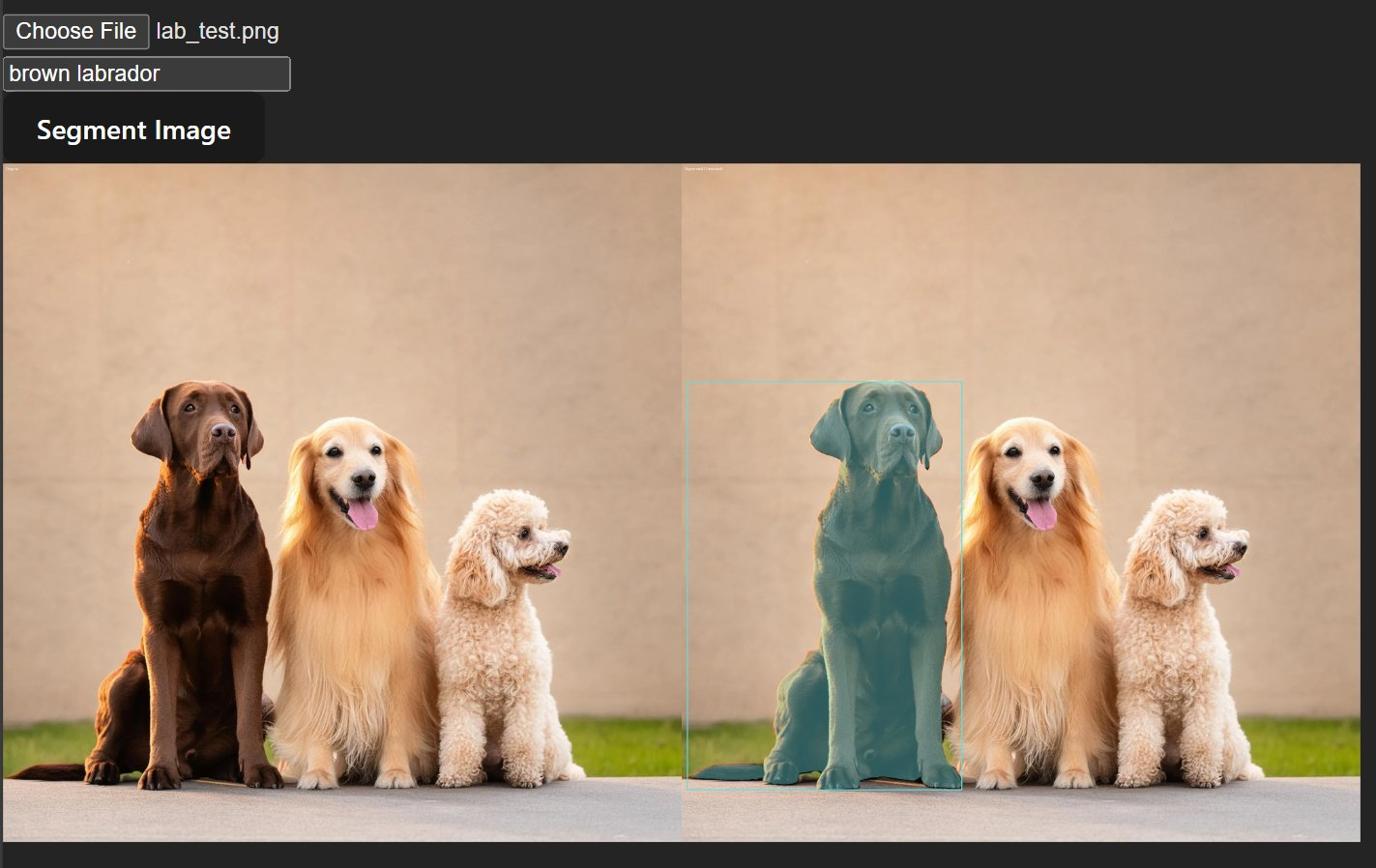
building a web app that segments objects in images and videos using text prompts. type "dog" and it finds all the dogs. type "person" and it highlights every person.
what is sam3?
SAM3 (Segment Anything Model 3) is facebook research's latest image segmentation model. unlike traditional segmentation that requires predefined categories, sam3 lets you describe what you want to find using natural language.
key features:
- text prompting - describe objects in plain english instead of picking from predefined classes
- zero-shot learning - works on objects it's never seen before
- mask generation - creates precise pixel-level segmentation masks
- bounding boxes - provides object locations alongside masks
how it works
the pipeline has three main steps:
- image encoding - sam3 processes the image into embeddings
- text processing - your prompt (e.g., "car") gets encoded
- mask decoding - the model outputs masks and bounding boxes where it found matches
visualization
each detected object gets:
- a colored mask overlay (60% original, 40% color)
- a bounding box in the same color
- consistent colors across video frames using
np.random.seed(42)
def create_visualization(image, masks, boxes):
    overlay = np.array(image)
    colors = np.random.randint(0, 255, size=(len(masks), 3))

    for i, mask in enumerate(masks):
        # apply colored mask
        overlay = np.where(
            mask[..., np.newaxis] > 0,
            (overlay * 0.6 + color_mask * 0.4).astype(np.uint8),
            overlay
        )

    # draw bounding boxes
    for i, box in enumerate(boxes):
        draw.rectangle(box, outline=colors[i], width=3)

    return overlay
video segmentation
video support was the interesting challenge. processing each frame individually would be slow and inconsistent.
challenges
frame-by-frame processing:
- videos have hundreds or thousands of frames
- each frame needs inference (2-3 seconds on CPU per frame)
- need progress tracking for user feedback
implementation:
@app.post("/segment-video")
async def segment_video(
    file: UploadFile,
    prompt: str,
    start_frame: int = 0,
    end_frame: int = -1,
    session_id: str = "default"
):
    # process video frame by frame
    while frame_idx < end_frame:
        # run inference on each frame
        inference_state = processor.set_image(pil_image)
        output = processor.set_text_prompt(state=inference_state, prompt=prompt)

        # update progress
        progress_status[session_id] = {
            "current": processed_count,
            "total": total_to_process,
            "status": "processing"
        }
the frontend polls /progress/{session_id} every 300ms to show real-time progress:
const progressInterval = setInterval(async () => {
    const progressData = await fetch(`/progress/${sessionId}`)
    setProgress(progressData)  // updates UI
}, 300)
frame range selection
users can select which frames to process:
- start_frame - skip intro footage
- end_frame - avoid processing unnecessary content
- saves compute time and allows testing on short clips
limitations
platform compatibility: sam3 has a hard dependency on triton, which only supports linux + NVIDIA GPUs. this breaks on macbook and windows machines.
the original sam3 code had CUDA hardcoded everywhere
the fix: i had to manually patch every hardcoded CUDA reference to support CPU, now it runs on macbook CPU (quite a lot slower though ~3 seconds per frame).
i couldn't even run it on MPS due to other issues as well.